
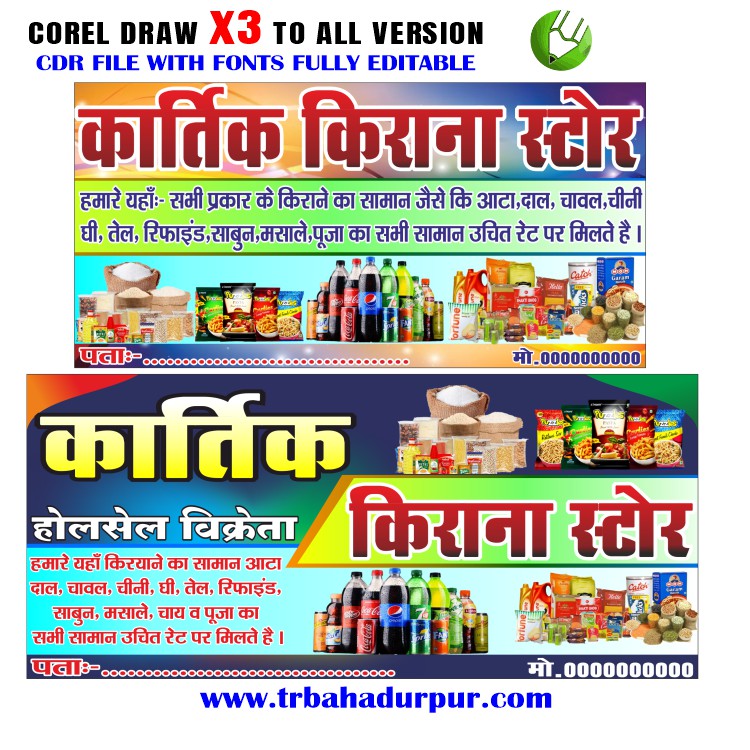
Attract Customers with a Professional Kirana General Store Banner Design (Free CDR File Included!)
In today’s competitive retail landscape, even a local Kirana general store needs to stand out. A well-designed banner can be a powerful tool to attract customers, advertise offers, and establish your brand identity in the community. This article explores the importance of a professional Kirana general store banner design and provides you with a free CDR file to get you started!
Thank you for reading this post, don’t forget to subscribe!
Why is a Good Banner Design Important for Your Kirana Store?
A compelling banner design serves several crucial purposes:
- Attract Attention: A visually appealing banner grabs the attention of passersby, drawing them to your store and potentially making them customers.
- Communicate Your Offerings: Clearly display the products and services you offer, highlighting special deals and differentiating yourself from competitors.
- Build Brand Recognition: A consistent and professional design reinforces your brand image, making your store more memorable and trustworthy.
- Increase Foot Traffic: By showcasing attractive offers and creating a welcoming atmosphere, a well-designed banner can drive more customers through your doors.
- Cost-Effective Advertising: Compared to other forms of advertising, a banner is a one-time investment that can continue attracting customers for a long time.
Key Elements of an Effective Kirana General Store Banner Design:
When designing your banner, consider these key elements:
- Clear and Concise Messaging: Use short, impactful phrases to convey your message quickly. Avoid overcrowding the banner with too much text.
- High-Quality Images: Use vibrant, high-resolution images of your products or your store to visually entice customers.
- Easy-to-Read Font: Choose a font that is legible from a distance. Avoid overly stylized or decorative fonts.
- Eye-Catching Color Scheme: Use a color palette that is appealing and consistent with your brand. Consider using contrasting colors to make important elements stand out.
- Contact Information: Include your store name, address, and phone number so customers can easily find and contact you.
- Special Offers and Discounts: Highlight any special offers or discounts you’re currently running to incentivize customers to visit your store.
- Download the File: Look for a link provided alongside this article to download the CDR file.
- Open it in CorelDRAW: You’ll need CorelDRAW software to open and edit the file.
- Customize the Design:
- Change the Text: Replace the placeholder text with your store name, address, phone number, and any specific offers.
- Update the Images: Swap out the existing images with your own high-quality photos of your products or store.
- Adjust the Colors: Modify the color scheme to match your brand identity.
- Resize and Rearrange Elements: Adjust the layout to best suit your needs and available space.
- Save and Print: Once you’re happy with the design, save it and send it to a professional print shop for production.
Tips for Printing Your Banner:
- Choose the Right Material: Consider factors like durability, weather resistance, and cost when selecting the banner material. Vinyl is a popular and versatile choice.
- Select the Appropriate Size: Determine the ideal banner size based on its placement and viewing distance.
- Consider Finishing Options: Ask about options like grommets (metal rings) for easy hanging or hemming for added durability.



Reviews
There are no reviews yet.